


Hi there,
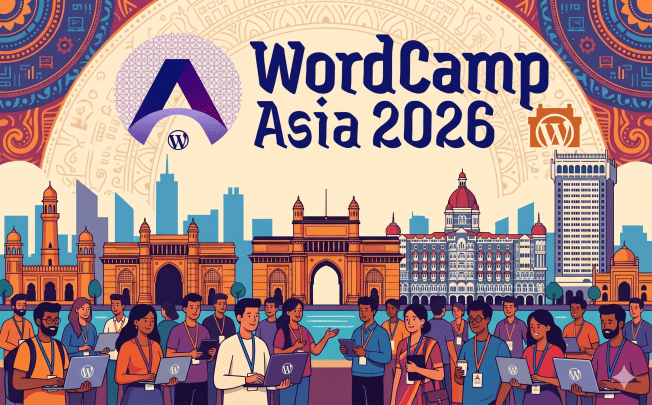
I am just back from my fourth WordCamp Asia and it was again fantastic! I also enjoyed Mumbai as a city to visit. The energy in the streets, the kindness of the people, the historic sites of many cultures and the deliciousness of the food. It was all an adventure!
Huge Kudos to all the people who put together a phenomenal WordCamp. It’s a lot of work, and it takes dedication, perseverance and an incredible amount of details to bring it all together for ca 2300 people to have a good time. And I am excited for next year to revisit India for the first WordCamp India as a fourth flagship event.
The angels behind the scenes already uploaded all 48 session videos to YouTube to the WordCamp Asia 2026 playlist on the WordPress channel.

And just in time for this Weekend Edition, WordCamp Europe announced their schedule, with two tracks for talks and two for workshops. In a few weeks, on June 4-6, 2026, roughly 1500 people will descend on Krakow, Poland. Will you be there?
If you would rather not get across the pond, there are a few WordCamps on the calendar in the US, too:
- WordCamp Santa Clarita, May 15-16, 2026
- WordCamp US, August 16-19, 2026
- WordCamp NYC is in early planning stage
A full list of all planned WordCamps in various stages is available at WordCamp.org
What else is in this Weekend Edition? AI in WordPress, block theme and plugin updates and more…
Have fun!
Yours, 
Birgit
Developing Gutenberg and WordPress
Miguel Fonseca recaps what’s new in Gutenberg 22.9, a focused release across 131 merged PRs. The headline addition is background gradient support for the Group block, letting you layer gradients over background images for the first time. The command palette gains organized sections for recent commands and contextual suggestions — experimental, opt-in via Gutenberg Experiments. Real-time collaboration gets stability fixes: block notes now sync without a page refresh, and the stuck “Join” button in the post list is resolved.
 The latest episode is Gutenberg Changelog #129 Artificial Intelligence, WordPress 7.0 and Gutenberg 22.8 with Beth Soderberg, of BeThink Studio

Anne McCarthy introduces the Twenty Twenty-Seven team: Henrique Iamarino leads design, with Maggie Cabrera and Carolina Nymark as co-lead developers. The standout addition is Juanfra Aldasoro stepping into a newly created lead mentor role — a deliberate move to make theme contribution more structured and welcoming for newer contributors. Starting earlier than previous default theme cycles gives the team room to be more intentional: the goal isn’t just a great theme, but growing the number of people who feel capable of contributing to WordPress theme work at all.
WordPress 7.0
The release date is still pending. An update is expected on or before April 22, 2026, next week. Stay tuned.
Benjamin Zekavica, previous Core team rep, offers a practical pre-flight checklist to prepare your plugins and sites for WordPress 7.0: if your plugins still use metaboxes, real-time collaboration will silently break for your users — migration time is now. PHP 7.2 and 7.3 are gone, MySQL minimum jumps to 8.0, and API keys in the new Connectors screen sit unencrypted in wp_options until Trac #64789 lands, so use environment variables instead. The iframed editor isn’t enforced in 7.0 core yet, but test your v2 blocks in the Gutenberg plugin today.
Core AI team member Darin Kotter cuts through the noise in WP 7.0 + AI: WordPress 7.0 ships AI infrastructure, not AI features. Your site won’t suddenly start firing off AI requests when you update. What lands in core are the provider-agnostic AI Client PHP API, the new Connectors API for managing external service authentication, and client-side enhancements to the Abilities API. Actual AI providers, features, and MCP integration all arrive via separate plugins — your choice, your setup.
Nevertheless, Depak Gupta,freelance developer from Mumbai and contributor on the Core AI team, published a plugin to Turn of all AI Features via the Settings > General page or via command line.
Plugins, Themes, and Tools for #nocode site builders and owners
Jamie Marsland poses an interesting question in The future of WordPress after blocks: what if the builder isn’t human? He suggests that blocks were made for people—easy to understand but difficult for AI to interpret. He envisions a future where meaning is more important than layout, editing becomes conversations, and WordPress transforms from a site builder to a content operating system.
Shani Banerjee highlights the new features in WooCommerce 10.7, mainly focusing on performance boosts: improvements on the high-performance order storage (HPOS) reduce the number of database queries by 51%, and using object cache significantly cuts down checkout query counts. There are also updated analytics export filters that accurately reflect currency for background jobs, a new beta PHP API for handling orders, fixes for the Cart and Checkout blocks, better contrast for accessibility, and increased security for order notes in the REST API and AJAX handlers. Banerjee has all the salient details for you.
Speaking of WooCommerce, Wes Theron walks you through the new course, Build your store with WooCommerce on WordPress.com. It’s free and beginner-friendly. You’ll learn everything you need to launch and manage an online store. In about an hour of bite-size video lessons, you’ll work through products, payments, shipping, taxes, and order management at your own pace, ending with a fully functional store and the confidence to run it day to day.
Derek Hanson‘s Cover Block Parallax Style v1.2.0 is more bug-fix than feature release. The most visible fix: the editor and frontend were using different default speeds, so what you previewed wasn’t what visitors saw. Two mobile-handling bugs got squashed — the original global viewport check meant parallax would never initialize after resizing from mobile to desktop. The main new feature is a per-block “Disable on mobile” toggle, replacing the blunt all-or-nothing approach. Background oversizing also bumped from 130% to 140%, matching what production parallax libraries use.
Elliott Richmond continues his WordPress.com series with Design Your WordPress Homepage with Twenty Twenty-Five, switching to the core theme he contributed to and building a hero section, call to action, and quick links grid — properly, using blocks the way they were designed. In 12 minutes you’ll learn how Groups, Covers, Grids, Global Styles, and Patterns fit together, and why understanding what’s happening under the hood makes all the difference to your layouts.
Theme Development for Full Site Editing and Blocks
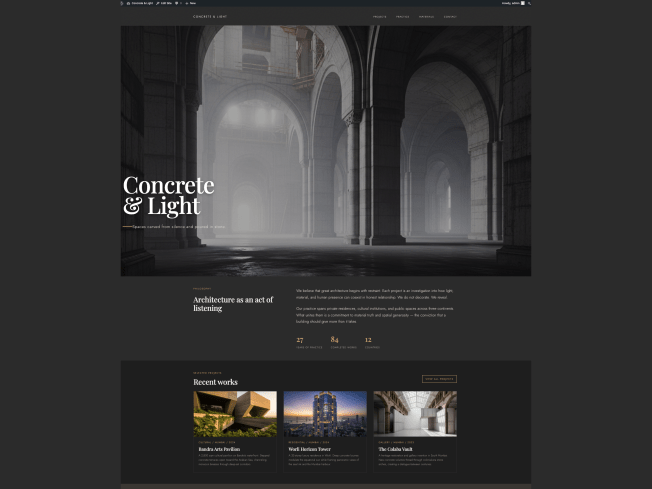
At WordCamp Asia 2026 in Mumbai, I ran a block theme development workshop and whether you were there or couldn’t get a seat, the full workshop bundle is now on GitHub — everything you need to build Concrete & Light, a portfolio theme, entirely through the Site Editor. Three guided exercises walk you through styling headers and footers, setting global element styles, and creating dynamic page and archive templates. You can be up and running in minutes via WordPress Studio, the Studio CLI, or directly in WordPress Playground.

Jonathan Bossenger documents how he built a custom WordPress block theme using Claude and MCP tools — no CLI, no code editor, just conversation. WordPress.com MCP tools let Claude audit his live site directly; WordPress Studio MCP tools wrote the theme files into his local environment. The key lesson: AI got him 80% there fast, but converting Claude’s raw HTML output into proper editable block markup still required a human in the loop — and Claude Code to help get it done.

Yann Collet, founder of Twentig, has launched Twentig One, a new free WordPress block theme built for the site editor. Lightweight and flexible, it offers templates, post formats, color presets, font pairings, and fluid spacing out of the box. Four starter sites — Business, Portfolio, Blog, and Personal — get you up and running quickly, with more on the way.
Building Blocks and Tools for the Block editor.
Eric Karkovack walks you through using the Remote Data Blocks plugin to pull Google Sheets data into WordPress, step by step. The plugin connects to Airtable, Shopify, and Google Sheets out of the box, with HTTP support for other sources. Most of the setup time goes into Google Cloud Platform — creating a project, enabling APIs, and generating JSON credentials. Once connected, your spreadsheet data renders via a block and a customizable pattern directly in the editor.
Varun Dubey shares a hard-won lesson in CLAUDE.md for WordPress Developers: Why Layered Knowledge Beats a Bigger File: when your instructions file hits 400 lines, more rules aren’t the fix. His solution is four distinct layers — rules in CLAUDE.md, facts in memory, procedures in skills, and capabilities in MCP servers — each loaded only when relevant. For WordPress developers already running Claude Code and feeling the weight of their own instructions pile up, this is the cleanup framework you didn’t know you needed.
AI and WordPress
Jeffrey Paul announces two quick releases of the WordPress AI plugin. Version 0.6.0 marked a shift toward connected publishing workflows — image editing and refinement landed as a full Feature, and the plugin was renamed from “AI Experiments” to simply “AI.” Now 0.7.0 is out, expanding editorial workflows further: Content Classification suggests categories and tags from your post content, Meta Description Generation handles SEO descriptions without leaving the editor, and bulk alt text generation lets you process your entire Media Library at once. Your next stop is 0.8.0, where Content Provenance tracking via C2PA and a “Refine from Notes” experiment are already taking shape.
James LePage, co-team rep of WordPress Core AI and head of AI at Automattic, catalogs what the community is building on top of the WordPress AI infrastructure ahead of 7.0. The volume is the point: ten community AI provider plugins, 70+ plugins adopting the Abilities API covering hundreds of millions of installs, dozens of MCP server implementations, fourteen agent skills, and tutorials in Japanese, German, Spanish, Portuguese, and Russian. WooCommerce, ACF, Ninja Forms, GravityKit, Yoast, and WP Engine are all in. None of it was dictated from the top — the community decided the building blocks were worth using. The post has about 180+ distinct resources and links. And LePage himself admits it’s not exhaustive.
JuanMa Garrido shares hard-won lessons in Using local AI models with WordPress 7.0: what I learned connecting Ollama — the kind the official docs skip. The biggest gotcha: call wp_ai_client_prompt() at init priority 25 or later, not the default 10, or authentication won’t be wired up yet and you’ll get a silent “No models found.” He also covers how to allowlist localhost requests (blocked by WordPress’s SSRF protection by default), register fallback auth for keyless local providers, and use is_supported_for_text_generation() as a pre-flight check before committing to an API call.
Gary Pendergast brings his AI writing experiment directly into the block editor with Claudaborative Editing 0.4. The new WordPress plugin — available on GitHub now, pending directory approval — adds a sidebar menu with Compose, Proofread, Review, Edit, and Translate modes, plus a pre-publish panel that suggests tags, categories, and excerpts. You control how much the LLM does: it can fix things outright or just leave notes for you to act on. Gary uses it mainly for planning — to organize his thoughts before writing, not to write for him.
What’s new in Playground?
Fellyph Cintra announces a new blueprint agent skill that teaches your coding agent to write valid WordPress Playground Blueprints from natural language prompts. Install it with one npx command and your agent gains a structured reference covering every Blueprint property, resource type, step sequence, and common pitfalls — so it stops guessing property names or forgetting require '/wordpress/wp-load.php' in runPHP steps. It works with Claude Code, Gemini CLI, Cursor, Copilot, and Codex.

Questions? Suggestions? Ideas?
Don’t hesitate to send them via email or
Send me a message on WordPress Slack or Twitter @bph.
For questions to be answered on the Gutenberg Changelog,
send them to changelog@gutenbergtimes.com